Fiber

Well, we’ve hopped on the fiber bandwagon. We were paying about $140/month for Spectrum cable with only internet – no TV, no phone lines, no DVR, nothing else. Earlier this year I had also returned my Spectrum router when I finally realized we had been paying an extra $10 per month just for that. We had the 1GB plan, which offers speeds of up to 1GB download and 35MB upload. The download speeds were decent, but often dipped below 500mbps probably due to our neighbors also using the same circuit. That wasn’t too bad for download speed, but for personal reasons, 35MB upload speed was quickly becoming a bottleneck.

T-Mobile Fiber was offering 2GB up AND down for $70 as part of their “Founders Club Deal”, which includes a 10-year price lock guarantee, among other things. To be honest, this deal was too good to pass up and I couldn’t wait for it to get here. A few months ago I was able to pre-order it, then it was just a matter of time before they contact me to schedule an installation date & time.

T-Mobile has been installing fiber in Kenosha from the North side to the South side for about the past year and a half. They dug up many lawns along the way installing the fiber connection boxes next to the sidewalks on the street side. Lucky us–we would up with two of those in-ground connection boxes in our lawn since we live on a corner lot. We have a box in front of our house and one on the side of our house. I wondered which box they would run our fiber from, hoping it would be the side-of-the-house box, since that one was closest to where I knew they came in with cable years ago.

On our installation day, a couple hours before the actual install time, a fiber truck came and started digging near the side-of-the-house box and ran their orange fiber line under the sidewalk and left a roll of fiber there next to the sidewalk. When the actual installer arrived later the same day, I gave him a walk-through and showed him where my router needs to go and where he needs to bring the line into the house. I also requested that he put the router in Bridge mode so I can use my own router, which was already configured for all of my (100+) devices and it’s actually a newer router than what T-Fiber provides. They give you a Wifi 6 router built into their ONT. My router is a Wifi 7. I purchased it when I returned Spectrum’s router to them to save the extra $10/month. T-Fiber doesn’t charge for their router, it’s all built into the ONT device they provide, and it’s a decent router, but T-Fiber provides very limited access to their router–I found that devices couldn’t even be renamed in the admin to identify them on the network easily. I need Bridge mode enabled to avoid the usual issues whenever you try to use two routers on one network. You basically have two of everything – two Wifi routers, two DHCP servers, two firewalls, etc. It can get pretty complicated trying to get everything to work that way. In bridge mode all of those features are disabled and bypassed. The internet signal passes straight through the ONT and into my own router.

As it turned out, the installation tech couldn’t enable Bridge mode, and neither could the tech at T-Fiber Support who he talked to. He told me I had to call support and request it myself, then they’ll enable it. I did this immediately after confirming my installation was successful and my speed test results were good for 2GB symmetrical internet service. I was told by support that they would put in the request and that someone will be contacting me within 24-48 hours. I assumed it might flip to Bridge mode at any time, so I kept an eye on the network during this time. I had a few issues, especially with having Double NATs, but this was expected based on my research into using your own router for Fiber.

The next day a T-Fiber Support Tech called me, but only to confirm that I wanted Bridge mode activated and that I would be using my own router from then on. I confirmed and he said he initiate the request and it’ll take up to 24 hours to complete, but it’s usually completed well before that time. I didn’t quite understand why this wasn’t done the first time I called, but it seems like there’s a second level of service that a ticket has to go through for Bridge mode, so my ticket had to get to that second team, then, after confirmation, the ticket can be processed. Anyway, at 5:30am the following morning (two days after the install) Bridge mode finally activated, so I rebooted my router and everything came back online as expected and my issues with have two routers were gone.

Everything is working great now, and they even came out exactly 1 week after the install and buried the orange fiber cable going from under the sidewalk to our house. They had estimated 10 days to bury the cable, so 7 days was even better. They did a nice job too, and didn’t destroy much of our lawn. They dug a thin trench, but only folded the top lawn over, then placed it back where it was afterward, leaving very little sign that it had been dug up at all.

All in all we’re very happy with our fiber so far, and having full control of my router is something I’m very relieved about. We had Spectrum for many years, and i even remember posting on my blog about them, especially when we kept killing hard drives in our DVRs. I think we went through 3 or 4 of them. I’d have to go back and read my old posts to be sure. That was back around 2004…wow, over 20 years ago now. My blog and really old. Today we have only internet service, and we subscribe to YouTube TV for TV and DVR services. No DVR except YouTube TV’s cloud DVR, which works great for us. No more landlines or FAX machines either, but internet. My, how things change. Now I have to start pulling out all of the old cable coax that runs to all the rooms in the house. It’s useless now. I think I still have all the wiring hanging from the ceiling in the basement for the old telephones too. Time to clean up.

Updated “Best Handheld Ever”

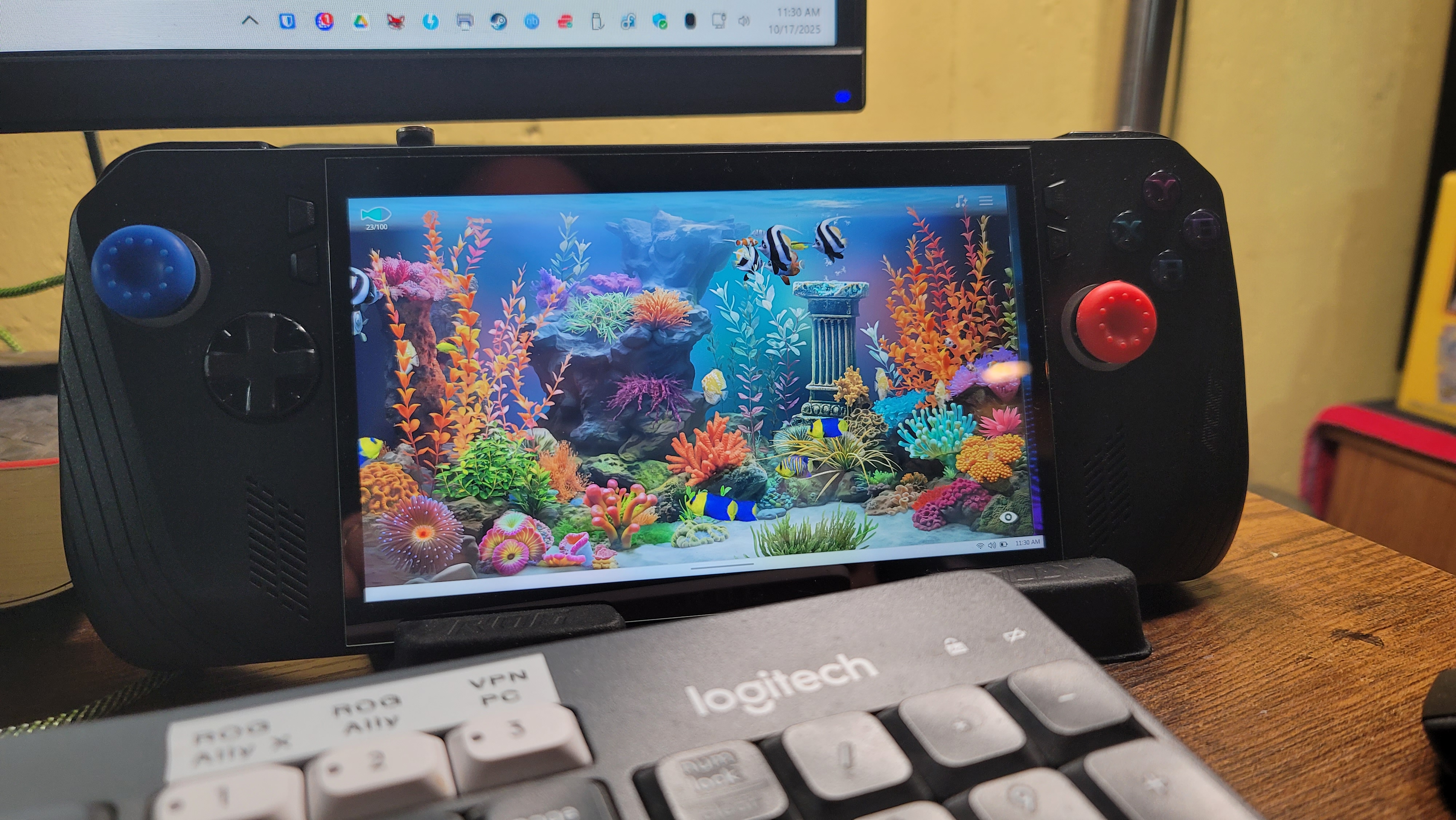
A few posts back (but over a year ago) I wrote about the best handheld PC I’ve ever had. Here’s the link to that post. Well, now there’s a new one. This one looks almost exactly the same as the white one in that photo, but it’s black. It’s the ROG Ally X, and it’s the next iteration in the ROG Ally series. It’s not the most recent, but only one generation older than the latest version, which is called the ROG XBox Ally and the ROG XBox Ally X.

They changed the case just a little and modified the back buttons based on user suggestions and all the minor changes are nice. This model is a little thicker than the ROG Ally, not not too thick as to make it more difficult to hold while playing.

One nice advantage to the thicker case is that the SSD is now a standard size and it also has room for an SSD heatsink – this means it can handle ANY standard SSD. So everyone’s touting the 2TB, 4TB, and 5TB SSD cards as great upgrades. I took it to the extreme though and bought the max – 8TB. Yes, it was a bit pricey, but for me it’s my dream machine now. It holds close to 200 of my favorite games and my entire retro collection – THOUSANDS of retro console and arcade games!

With a nice 1080p 7″ display, this is everything I could want in a handheld. Every game I’ve ever played in my gaming PC I can now play in my hands, anywhere. The battery is even better than the ROG Ally, and it’s more optimized, and since the X-Box version has recently released, the built-in control software, Armoury Crate & Command Center, has recently been enhanced quite a bit with new features and functions, aligning it more with X-Box. The X-Box features don’t interest me much overall, as I’m not a subscriber, but I like and own a lot of the X-Box games, so the more the better.

I’m not sure I ever posted anything about this, but a couple years ago I sold my huge collection of games, consoles, and accessories. I had a few Playstions (3 and 4), a few X-Box versions, and even a Wii and Wii-U, as well as many accessories and physical games for them. They all sold pretty quickly and I freed up a lot of space in my mancave. This makes the retro collections, and the ability to play my games anywhere I want even that much more valuable to me.

I had to keep my Nintendo Switch, as the Nintendo games (like Mario, Kirby, etc.) aren’t available for PC like most other games are – they’re locked to Nintendo (except their older emulated games) and I still wanted access to them. Pretty much everything else I enjoy to play is available in a PC version. So now I’m down to two platforms – PC and Nintendo – and most games are digital as well, so I’m saving a lot of space at home.

Anyway, that’s my update. If you have any comments or questions, I’m checking my site much more often now, so feel free to post a message. I believe my site will also e-mail me whenever anyone posts a comment, I’ll be notified fairly quickly.

Thanks for visiting!

Weep Holes

We’ve been having a problem lately with bees and flies getting into our house and driving us, and our dogs, nuts. We thought at first that they’d just sneak in whenever we opened a door to go in or out and let the dogs in and out, but now it’s occurring more and more often.

Yesterday we found several bees that came in, and we figured out that they start in our big bay window in the living room. They’re coming in through our weep holes in the windows! I never even knew what weep holes were before, but I assumed since all of our new windows had these little slots below them, that they were necessary. These slots are for water drainage when it rains and water enters the screen and into the sill. The water then drains through these weep holes and out through the hole on the exterior frame of the window outside.


I figured there would at least be some kind of filter in the middle or something, like a screen, to prevent insects from using them, but no, this is apparently an after-market thing no one tells you about until it becomes an issue! All sorts of Weep Hole Patches are sold on Amazon, we just learned, so a pack of those will be here today. They are tiny screens that you attach over the weep holes on the inside of the window and they prevent bees and flies from enter the house.

From what it looks like, our big bay window in the living room is the only window in our house with weep holes. I wonder why all of the smaller windows don’t have them. Surely water can still accumulate in their sills during a sideways downpour… Hmmm. Anyway, this should definitely resolve our issue.

I’m really tired of chasing down bees and flies in our house. But it was kind of thrilling with the bees. We have a portable zapper that’s shaped exactly like a tennis racket. There is a zapping metal screen where the racket netting would be. I flip it on, then swing it at a bee. If I’m lucky there’s a satisfying SNNAAP and the bee sticks to the screen so I can easily dispose of it. A lot of times I catch the bee or fly in the window though. Those are easier. Just quickly lay the racket screen against the window, over the bee or fly, and wait. It’ll try to fly away and POP! Another one down. Kevin is just evil though – whenever he catches one he’ll keep it on the grid with the zapper on and just watch it sizzle, spark, and smoke. Yuck, what a stink that creates! I must admit though, bees are much much easier to zap than flies. Flies are much faster. And stealthy. They sneak around the entire house, and don’t just stick to windows and bright lights trying to find a way out.

Home Viewer

I found an old Home Viewer magazine recently, and I’ve been reading through it. It was known as “The VCR Entertainment Program Guide”. This is the February 1986 edition and costed $1.95. The highlighted movie at the time was Return of the Jedi.

It’s pretty fun to read through and recall many movies I had forgotten about. Including all the ads selling VHS copies of various hit movies, and even a full-page ad for the “CBS Video Club” – “Own a movie forever for the cost of seeing it once – Just $4.95”. You pick from 70 top movies and when you pay the $4.95 you commit to purchasing at least 2 more movies at regular club prices within the next year. THOSE prices, or even samples of those prices, are not shown. I remember my brother-in-law paying $99.99 for Star Wars on VHS though, so I can only imagine.

There’s a lot of full-page ads for movies in here, including Ben (remember the Michael Jackson song?), Mask (starring Cher and Eric Stoltz) , and the brat pack’s St. Elmo’s Fire. Even a few good articles, like one on Orson Welles and Return of the Jedi, which I’ll probably re-read.

I gotta dig up some more of my old books and magazines, this is fun.

Catching up

A lot has happened since I last posted here, which was in December of 2023. And by a lot I don’t only mean with me, I mean with everything, including my family, friends, the country and even the world. So much so for the latter that I’m pretty reluctant to post ANYTHING these days.

The whole world has gone AI in an instant, but that’s only part of it. Everything has become so different, free speech has become compromised, and our country has become so screwed up. I’ve never seen things this bad before. Our new government seems “upside-down” now, somehow, and I can’t even comprehend how it keeps getting worse and worse and how we somehow let it continue like there’s no way to stop it.

That’s all I’ll say though, I’ve probably said too much already. I don’t get political at all, so even writing just that bothers the hell out of me, and I’ll probably delete it, or this entire post, before you know it.

That’s primarily why I haven’t posted in a couple years. Lord knows I have the time to, having lost my job in May of last year. At that time I was 61 and couldn’t start Social Security yet. I had planned on working until at least 62 so I could go on Social Security after that and retire with my 401k intact. Being forced out at 61 was a real kick in the teeth and I’m too old to start my career all over again. So we struggled for a year and I ended up taking from my 401k and DoorDashing until my Social Security could finally start.

We’re in a little better shape now, having paid off a majority of our debt, and I’m finally collecting social security. Sandy has had another surgery on her foot (this is the second attempt to repair it, the first one was unsuccessful) and is in outpatient therapy now to get better but she’s not to the point of weight-bearing on it yet.

Sandy’s brother Rick has made much progress since his last fall when he was living up North in Wisconsin Rapids, which nearly killed him. He’s completely sober now, since March, and he has moved back to Kenosha so we can help him. He was in a rehab facility for a few months and just recently moved into his own apartment in Lakeside Towers here in Kenosha. He really likes it down there. Right on the lake with an awesome view.

I’ll be back with more soon.

Best Handheld Ever

I love new tech and gadgets – even at my old age – and I recently found the ultimate gaming handheld.  I’ve had a Nintendo Switch for several years, and still do, but this is something completely different.  I’ve always been a PC enthusiast, and I use them all day, every day for my job as well.  I like playing with the newest, smallest tech, so I buy small but powerful desktop PCs, like Intel NUCs, but I also enjoy the high-end gaming PCs that can handle just about anything you throw at them.  Lately I’ve even focused so much of my time on PCs, that I haven’t had any time at all to play any of the gaming consoles I had, which included an X-Box (original version), an X-Box One, a PS3, PS4, a Nintendo Wii-U, and the original model of the Nintendo Switch.  So I ended up selling those systems and the hundreds of game cartridges, discs and accessories that went with them.

So these days I’m all-in on PCs (except for the new Nintendo Switch model – since Nintendo hasn’t given in to offering their current Switch games on any other platforms, YET…like most other companies do, I’m hanging onto it for now, just so I can still play the latest Nintendo games.  But I digress.  I’m all-in on the PC train, which made this purchase a no-brainer:  The ROG Ally.  To put it quite simply, it’s a Windows 11 Gaming PC in a handheld form factor.  That means it’ll run pretty much everything any PC will run, which is perfect for me.

The design of the ROG Ally is really nice, and it feels really nice and comfortable, with a very crisp, clear screen.  I’ve spent several hours at a time playing games on it without any issues (except eye fatigue, but that’s a personal issue of mine as I get older, not any fault of the device).  I’ve heard that the new version of the Steam Deck, now with an OLED screen, is much better, but it’s still only 800p. The ROG Ally is 1080p, but you can lower it if needed.  Same with refresh rate – it’s 120Hz, but can be adjusted as needed, and all of these settings are instantly accessible using a special button to bring up the “Armoury Crate” app, which includes a fully customizable control panel of all of your favorite and most-used settings, including an overlay options very much like Google’s “stats for nerds” option in YouTube.  It’ll show specific memory, CPU, FPS, and other details overlayed on the screen, permanently, until you turn it back off.  This is very handy for troubleshooting or reviewing app or system performance.

Windows 11 isn’t the best with touchscreen support, but ROG has managed to make it quite usable with their add-on apps and drivers that are accessible from a few added buttons on the device.  There was, and still is, a little learning curve involved, but I’m getting pretty comfortable with everything after a few weeks of using it so far.  I still prefer to use a Bluetooth keyboard and mouse when doing a lot of configuring and installing of software and games on it, but that’s normal for a new PC.  The beauty of it is being able to take it anywhere and be able to play everything I like without having to lug around my heavy gaming laptop everywhere.

I originally purchased the 512GB ROG Ally, which is the better, faster version of their two models with a faster CPU than their other model, then Best Buy had a Black Friday deal on a SSD upgrade specifically for the ROG Ally and Steam Deck handhelds, offering 1TB and 2TB options, so I couldn’t pass up a 2TB upgrade.  The install was pretty simple and went flawlessly, I just had to do a “Cloud Restore”, which is an option in the ROG Ally’s BIOS, then I had to restore all of my games and updates again.  I hadn’t gotten very far into initially installing all of my games at that point, so it wasn’t much of an issue to start over again.  So right now, with the 2TB SSD and a 1TB microSD card I had left over from a Nintendo Switch that I had previously sold, I now have 3TB of storage on my ROD Ally, which is plenty of room for everything I need.

My game collection also includes emulators for many old game platforms and a collection of tens of thousands of classic games from the past that I have amassed over the years, such as thousands of N64, NES, SNES, Sega Saturn, Gamecube, and Atari, all of which run great on Windows 11, so they also work fine on the ROG Ally.  This makes it truly priceless for me, literally providing me with every game I own, at my fingertips, anywhere I go with it.  I decided to dedicate the slightly slower 1TB microSD card to just my emulators, so I pared down a 5TB portable collection of about 65,000 retro games to just under 1TB.  I ended up with about 45,000 games and much less garbage and duplicate games, keeping all of the gems and classics.  That’s just 1 TB.  The faster 2TB I’m using for the OS, the “Grade A” games and everything else.

The sound on the ROG Ally is also really nice, though I often connect my Anker Soundcore earbuds when I use it, just for the privacy, noise-cancelling, and enhanced audio.  At this point I just want to lug this thing everywhere, just in case it might come in handy.  I can watch or play anything – Plex for movies & TV shows, YouTube, Spotify… well, you get it, it’s a PC.

To wrap things up, here is my list of the Pros and Cons with the ROG Ally 512GB Handheld:

PROS:

  • Runs ALL Windows 11 applications and games – Steam Deck runs on SteamOS and only runs compatible Steam Games.  This is akin to how the iPad locks you into only running Apple’s App Store games and apps.
  • Touchscreen – Same size screen as the Steam Deck, but 1080p resolution – Steam Deck is only 800p.
  • 120Hz refresh rate, adjustable as needed.
  • Power adjustable 10w (Super Quiet) – 35w (Turbo mode).
  • Lighter than the Steam Deck.
  • I can remote to it easily, just like a regular PC, whenever needed.
  • Controls feel nice and are well laid out – all buttons are fully customizable in 2 modes: Gamepad or Keyboard.
  • Two additional buttons on the back, fully programmable, and two added front-panel buttons specifically for ROG Ally’s settings (Armoury Crate)

CONS:

  • Learning curve involved with what button mode to use for each game and game type.
  • Battery lasts 90 minutes to 2 hours with heavy gaming.  Using lower power settings can extend that to 4-5 hours though.  I purchased as 30,000 mAh 65w fast-charging power bank to use with it, which easily gives me a full day of battery use.
  • Single USB-C type connection for everything – charging, external display, etc. – and it’s located on the TOP of the ROG Ally, so there’s no way to have a wireless dock connection.  Even with a premium dock with fans, multiple USB ports, HDMI, network port, etc., it still requires a short physical wire connected from the dock to the top of the ROG Ally.  I highly recommend a magnetic USB-C adapter so a dock or charger can easily be attached and detached thousands of times without ever damaging the port on the ROG Ally at all.  (I now always use one of these adapters on my cell phone as well – they’re priceless for ease of use and safety, if you’ve ever tripped over a USB cable before while your phone was charging with it)
  • When in use, a lot of heat blows from the top vents.  This is only a negative for ME though… our two chihuahuas enjoy the extra heat, and often snuggle up with me when I’m sitting on the couch playing games on it.

Settling in

I’ve settled on the theme “Twenty Fourteen” for my site. It’s very simple, works great on all of my devices, and it has “infinite scrolling” (and it’s free). Infinite scrolling means it will display the first group of posts (I think I set it to 20), but if you get to the last post when scrolling down, it automatically loads the next 20 posts. So basically, you can keep scrolling and read every single post on my site without ever having to click a “Next Page” link. I like that. I’m lazy.

We’re doing good with our new hosting services so far. It definitely can’t be beat for the price. And all of my subscription options and hosting settings are embedded right into the WordPress administration menus, so I don’t need to go to multiple different websites like I did before. I wish I had made this change years ago.

I configured the main menu to be pretty much the same as what I’ve had for years, but with a few additional links to my social media accounts. Yes, I know “Twitter” is “X” now, but I refuse to comply. I’m sorry, but X has, and will always be, to ME at least, the universal symbol for “Close” or “Close Window”. I refuse to call Twitter “X”. It just sounds wrong, like it’s a port site, or something banned or crossed-out. Even in the Twitter app, which has an “X” in the middle, I’ve instinctively tried to close it once or twice by stupidly pressing that logo. Yeah, I’m an IT geek, I’m just getting old. But I’m never going to add a menu item to my website with just an X in it.

Enjoy the site, and I welcome your feedback. Even if it’s just on whether or not you can add comments or not… I opened it up a bit to not require a login, but that got really messy the last time I tried it, with hundreds and hundreds of bots and worldwide spammers posting garbage everywhere. I’m curious if that was just a side-effect of my hosting provider though, so I’m giving it another shot to see how it goes.

Welcome to our new home

This is my first post on WordPress.com. I have moved my website from my previous host, Powweb.com. I had been with Powweb for many years and up until now I haven’t had many issues at all. But their hosting price, for my very simple, small website, recently tripled in price, and with no warning I was charged for another year at triple the price, with no prior notification. I was pretty shocked when I saw the charge, and immediately contacted them.

Discounts were offered and refused, and it took a few attempts, but I finally got the charge reversed and my site cancelled with them. I was able to make a quick export of my website, so I didn’t lose any of my old posts, fortunately. So here it is. Some of the links and functionality might be broken, but I’ll fix every issue I find. And as usual, I’ll try to post as often as I can.

Over 813 posts since January of 2001. That’s over 23 years of history. I only wish it included all of my Facebook posts as well. But, as I’ve always figured, Facebook will eventually go away, like everything else has, but I’ve tried to keep my own website intact through the evolution of the internet and its vast changes. Maybe this site will even outlast me. That should be easily accomplished, since I’ve already paid for the domain itself five years in advance, and I just got an additional year tacked onto it just for moving to WordPress. As long as someone can swing the $48/year ($4.00 per month), this thing will sit here, waiting for another year’s tens of users to stop by and read my ramblings.

Enjoy!

The ShopVac Facebook Paypal Scam Attempt

We’ve been trying to sell an old ShopVac on Facebook Marketplace recently.  We didn’t have any hits on it for weeks, then Sandy gets a message from a guy named “Darren Knowles” the other day, interested in the item.  I blocked out our personal details in the screenshots in this post, by the way.  Here’s the conversation:

At the point where Darren started a Facebook call, Sandy answered it and spoke to him.   She was pretty confused with what he was saying, and since the Paypal e-mail address was mine, she gave the phone to me to talk to him.  I was confused already, wondering why she would give her phone number to this person, but she didn’t, he started a voice call on Facebook.  I learned that afterward.  I took the phone and he said he sent the $50 payment to my Paypal address and was asking if I got the e-mail or the money in my Paypal account.  I checked both and said no, I don’t have either one.  He insisted he sent it and asked me to check my junk and spam folders.  Nothing there either.  I had previously received money from other people through Paypal in the past, so this normally isn’t an issue at all.  I repeated my Paypal e-mail address to him, but he read it back as a gmail.com address instead of my personal domain e-mail address that Sandy had given him.  I corrected him, then he said yes, that’s the address he sent it to, and he asked me to check again and keep checking.  Eventually, shortly after that, an e-mail came in.  I started smelling a scam at that point, knowing he’s only send an e-mail and isn’t actually sending money to my PayPal account.  Here’s what the e-mail said:

At this point I was confused for a few moments, as I read this e-mail, first to myself, then out loud over the phone conversation with “Darren” (who I also now realized had a pretty odd accent for a guy named Darren, by the way), and I told him I was certainly NOT going to pay $300 for a “Paypal Business Account” or have him pay $300 for this and re-imburse him for it.  I said I’d figure this out and get back to him, then I hung up.

So next I looked at the “Paypal E-mail” a little closed and then it got pretty clear as a scam:

Oh sure, payservpalbuss@gmail.com must be Paypal alright, yessir, I’ll buy that for a dollar!

So I’m sure he had some pretty interesting plans to somehow convince me that he paid the total of $350 to Paypal, and now I need to send him $300 to pay him back, minus the $50 for the shop vac… Then what?  Does some contact of his located nearby actually come and get it??  I just wonder.

We reported him to Facebook, but I’m sure he has plenty other accounts to use to keep scamming.  Unfortunately he got our actual address and my Paypal e-mail address, which we’re not too happy about, but at least he didn’t get the ShopVac or any money from us.

We definitely won’t take anything other than cash for anything else we ever sell, if anything.  And even with that we can’t be sure we won’t get counterfeit bills or robbed at gunpoint when the buyer shows up.  It’s pretty crazy out there these days.  Stay safe!

What have I watched lately?

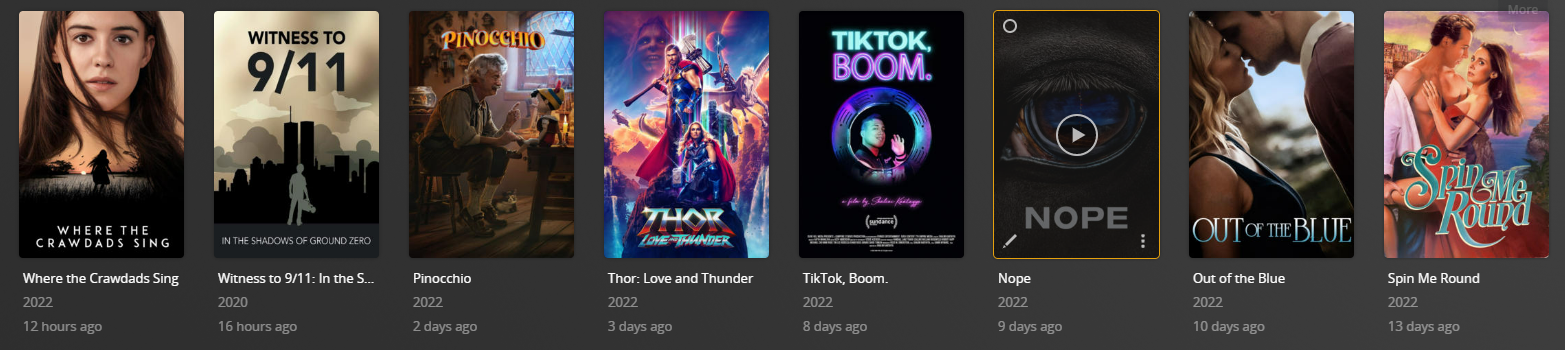
The screenshot above shows the latest movies I’ve watched and exactly how long ago I watched them. Let’s dive in:

Where the Crawdads Sing: Wow, this was a great movie. Sandy and I watched it last night and really enjoyed it a lot! Even looks like it could win a lot of awards.

Witness to 9/11: Yesterday I was browsing through the 9/11 content, since today is the 21st anniversary of the disaster, and I noticed that Plex says Harrison Ford (from Star Wars, Indiana Jones, etc.) was in it. I had watched this one before, and I didn’t know he was in it, so I was very curious. I watched it all the way through again and found that this is wrong… Unless he was in the background somewhere on the streets of New York City, but I don’t think he was in this special at all.

Pinocchio: This is the live-action version of the Disney classic. It was pretty funny and an interesting modern version of the classic kids will probably love. Tom Hanks plays Gepetto.

Thor – Love and Thunder: Kevin and I absolutely loved this one and the music was just fantastic! All great classic 80’s tunes and a couple hilarious screaming goats that got a bit on my nerves after awhile, but Kevin enjoyed them to no end.

TikTok, Boom: This is a documentary about the controversial rise of TikTok. I thought it was pretty good until it got very political about 1/3 of the way through. But it was ok. I was hoping to see a hugely popular Kenosha local I enjoy a lot on TikTok – Daniel LaBelle, but no such luck.

NOPE: Awesome horror movie, very different though, which is expected from Jordan Peele (from Key and Peele). Enjoyed it a lot. Did I hate it? Nope.

Out of the Blue: Very good low-key movie. I thought it would be a sappy love story, and it was a love story, but very different. Kept us very interested to the very end.

Spin Me Round: Surprisingly, this movie was better than I thought it would. Especially by the look of the cover – I expected a really sappy love & romance story, but it was far from that, with some very unexpected twists.

That’s it for the past couple weeks in movies. Maybe next I’ll list my recent TV shows and miniseries I watched.

Where do I find movies and shows to watch?

Since I watch so many movies, TV shows and miniseries, I thought I’d explain how I find them.  Sure, sometimes it just from plain old-fashioned advertising:  Ads on TV (Google TV, to be specific), ads in Happenings magazine, ad on the internet, etc..   Whenever I see or hear about something I might be interested in, I add it to my list.

I keep a list in OneNote, a Microsoft app I have on my phone and on my computer.  That list contains all of the TV shows and movies I’m interested in, ongoing, upcoming, and from the past.  It gets updated a LOT.  With all of the entertainment available in the world these days, it can get a bit overwhelming at times, especially during certain times of the year, like during “sweeps” or the summer blockbuster season.  But when those times come around I actually enjoy them – it gives me a chance to renew and update a lot on my lists so I have sort of a “queue” of shows and movies I can watch whenever I have time – sort of a “watchlist”.

Over the years I have converted every single DVD and Blu-Ray disc we own into digital format and added it to my Plex server – A movie application much like Netflix.  Plex is simply a different streaming service like the others, except it also allows users to and to add their own content to a personal server, then serve it up as if it were just another piece of media on their service.  Plex has allowed me to avoid having to physically insert a piece of media into a device to watch something for years now.  Now we just need to get our fold home movies – all in ancient formats of different kinds – before that media deteriorates completely – if it hasn’t already.

Plex’s free movie and TV offerings are one of my sources as well as another place I keep my “Watchlist”.  At any given time – especially during holidays – they’ll often curate a list of odd titles, like “Plex Picks”, “What’s on Now”, “Trending Trailers”, “Most watched this week”, “New for the family”, “Released this week”, “Coming Soon”, etc., and they even get pretty funny during special holiday periods with oddly-titled lists.

I could just use those lists to find and consume plenty of content, but I’d rather stay open to using as many other sources as I can, just to keep an open mind and see what’s out there, see what everyone else is watching, what they like and dislike, then I try to maintain my watchlist based on all of that input.

With so many streaming services available today – all fighting to get you to subscribe to them for a monthly fee – that alone can also be pretty overwhelming.  Personally – and surprising to some – I don’t keep a subscription to many of them.  I pick and choose which services to subscribe to at any given time.  Sometimes I’ll choose one streaming service and subscribe for a month, maybe two, watching everything I want from their service, then I’ll cancel or “pause” my subscription and move to something else.  This gives me a chance to learn their interface and see everything they offer, new and old, and watch all I can from them, to see how they stack up against the rest of their competition, then move on.

Pretty much the only streaming service I’ve kept for any length of time – and still have – is YouTube TV.  That name is pretty deceiving – YouTube TV has nothing to do with YouTube, it’s simply own by the same company – Google.  It’s actually just another streaming TV service.  But I’ve tried several others and I haven’t found one with better features that I like.  We only subscribe to the basic plan – about $65/month these days, but still a huge discount over cable TV.  Plus, it offers everything streaming with no actual cable wires, so you can watch it anywhere you have internet, and on a ton of different streaming devices and pretty much any device with a browser.  YouTube TV also offers the best DVR options I’ve ever found anywhere:  The DVR has unlimited capacity – record dozens – or hundreds – of shows and movies, and they all remain on your account, ready to watch at any time.  The limit they impose is “time” – 9 months.  Anything you record will stay for 9 months, guaranteed, then after that it will eventually expire and be removed from your recordings.  But thanks to reruns and movies that are re-aired, most of the time things will stay recorded much longer, and they also offer “VOD” (Video On Demand) versions of some shows, which are offered indefinitely, or at least don’t expire any time soon.

But enough advertising for YouTube TV, this post is about where I find my content.  IMDb.com is another source of mine.  Check the front page there to get started, or just search for any movie, TV show, actor, director… You’ll find plenty of rabbit holes there to keep you plenty busy, digging up some of the oddest and coolest content you never knew about before.

Google Play Movies & TV – This is another site I use often to see what just came out and what’s the most popular – especially the “Top new movie releases to rent or buy” list.  It scrolls, by the way, but they don’t make it obvious – hover over the last movie in the row and a “>” appears at the right edge – click that arrow to scroll another page to the right.  Do the same on the left edge to scroll the other way.  Those “$19.99” (or sometimes even higher) movies should be blockbusters… or at least you’d think so.

JustWatch – This page displays 201,018 titles (and rising).  Very simple, just sort the list whichever way you want:  Popularity, Trending, Alphabetical… I tend to use Popularity the most.  That’s the default setting when you visit the web page.  I think JustWatch even offers an app that you can use to customize the list based on just the subscription services you use, but I haven’t used it.

There are tons of other sources, but those are my primary go-tos.  In addition to those, I usually check out whatever “Gino at the Movies” suggests on Fox 6, what Happenings magazine includes in their many reviews, articles and lists each week, ads that come up on the Roku home screen, those appearing on my Nvidia Shield screen, and a few other sources, including friends and family.


A new pile for my Watchlist

I finally finished the Mel Brooks book. That was very fun, and as a result I now have a much bigger watchlist. Last week I watched a special called “In Search of Tomorrow – The Definitive 80’s Sci-Fi Documentary”. I thought it was your basic documentary, maybe 90 minutes to 2 hours long… Then, after a couple hours of watching it (and taking notes) I checked my progress and realized I wasn’t even halfway through it! It’s a 5-hour-long documentary! But in this case, that’s a GOOD thing. I loved all of the details about the 80’s and sci-fi, not to mention the occasional Wil Wheaton pop-in I wasn’t expecting.

I learned about many classic gems I hadn’t even heard of before in here, including Flight of the Navigator, Galaxina, Collossus: The Forbin Project, Saturn 3, Cherry 2000, Mac and Me and many others. There goes my watchlist again. Other classics were in there that I had watched before, but remembered very little of them because I was so young when I saw them, like Disney’s the Computer Wore Tennis Shoes, starting Kurt Russell as a kid, Fantastic Voyage, Alien Nation, and Outland. More Watchlist fodder.

There were even older classics from the 70’s and 90’s–responsible for the inspiration of some other movies, which I’m now also interesting in seeing. My Watchlist just grows and grows.

New releases lately that I’m interested in and have added to my watchlist: Jurassic World Dominion, Adeline, The Royal, Hello, Goodbye and Everything In Between, and a few others.

That’s about it. Tons to watch and so little time. I gotta go get to it.

More Mel, Classic TV, and Superintelligence

Yup, I’m STILL reading Mel Brooks’ book, “All About Me!”, so I’m looking for more classic movies he talks about. The most recent ones are The Artist, an academy-award-winning silent movie from 2011 that I never watched before. Probably because it’s a silent movie. But Mel talked me into it, so I’ll give it a shot. The Elephant Man (1980) – another movie that’s supposed to be great, but I never watched it, 84 Charing Cross Road, one I’ve never heard of before, but now I want to watch it, and Solarbabies, another one I hadn’t heard of, but it was a huge problem for Mel Brooks’ production company, BrooksFilms, costing tons more money than what was budgeted. It doesn’t seem to be good as far as ratings go, but I gotta check it out.

I recently made the mistake of putting on “100 Greatest TV Themes”, an album on Spotify, to listen to something in the background as I was working. I like to work with a little background music playing low, nothing intense, just sort of like elevator music playing softly. So I’ve taken to listening to a lot of movie and TV soundtracks. But when I hit played this particular album, it often triggered memories of old TV shows, so I had to dig up things I rememebered that I hadn’t dug up previously. Like 21 Jumpstreet, Lou Grant, and Who’s The Boss. At the time they were awesome. We’ll see how they hold up over time.

We watched the movie Superintelligence this week and I really enjoyed it! It’s about an A.I. that decides it’s going either enslave, save or destroy humanity, so it contacts Melissa McCarthy’s character by taking over all of her smart devices in her life and manipulating her to test how humans work and interact to help make its big decision on what to do with humanity. I found it pretty amusing.

Ann Bancroft and Yucko the Clown

I’m still reading Mel Brooks’ “All About Me!” and he married Anne Bancroft, so of course I have to dig up anything he recommended that his wife made, such as “The Miracle Worker”, the movie that won Anne the Academy Award for Best Actress. Mel says it’s an excellent movie, so of course I gotta put it on my watchlist. Plus “The Twelve Chairs”, a crazy Mel Brooks comedy I hadn’t heard of before that I have to see now.

Yucko the Clown is a whole different story. He was recently discussed on the Howard Stern Show (yes, I still listen to Howard). Yucko was apparently a big thing on Howard Stern many years ago. I vaguely remember hearing the name mentioned before, but I apparently missed him completely. He was a very rude, drunken clown. But that was quite some time ago. Now he’s in Hollywood making it big in animation. His name is actually Roger Black. He made the animated shows Brickleberry, Paradise PD, and a new animated Sci-Fi series coming out very soon called Farzar. All shows I’ve never seen before, but now I gotta check them out. My apologies in advance if the embedded videos offend anyone.

Pixar Shorts

Just a trivial note:. There are 37 small Pixar Short Films. These were released on 3 discs, separately, as Pixar Short Films Volume 1, 2, and 3. Some sources include them in a single “Collection” titled simply “Pixar Shorts”. Go figure.

Mel Brooks

I’m currently listening to Mel Brooks’ audiobook, “All About Me!” so I’ve been digging up (or trying to dig up) a lot of really old movies and TV shows. Many seem to be completely nonexistent, like “Your Show of Shows” which is featured a lot in the book, since it was a big part of Mel’s life, but I can’t seem to find a trace of it anywhere. It’s a really good book though, he’s had an awesome life. So if you see some very old movies and TV shows pop up somewhere familiar, this would be why.

Strange movie is out

For the Marvel fans out there, Doctor Strange in the Multiverse of Madness is out on digital now. My stepson Matt saw it in theaters and said it was awesome. You can watch it in 4K or 1080p. Being a huge Marvel fan myself, I’m looking forward to it, but the trailer seemed pretty confusing. We’ll see. I’m sure Kevin and I will watch it very soon.

Write what you know

I’ve heard that a lot – “Write what you know”, and this site has gone unused for way too long. So I’ve decided to write what I know. I’m obsessed with movies and TV, and videogames. Well, I’m more of a spectator than an actual player of videogames, but I collect them anyway, figuring when I retire I’ll have all the time in the world to play around with them. Like my dad did when the hundreds of Beta and VHS movies he collected. Lets go ahead and get started, shall we?

As I write about movies and TV shows here, those “in the know” will know where to find them all the easiest, so I won’t bother to provide sources. This morning I found a new movie that looks pretty good: “Jerry and Marge Go Large”. We’re going to watch it tonight. It stars Brian Cranston and Annette Bening, in addition to several other great actors. Here’s the description: “The remarkable true story of how retiree Jerry Selbee discovers a mathematical loophole in the Massachusetts lottery and, with the help of his wife, Marge, wins $27 million dollars and uses the money to revive their small Michigan town.”

I didn’t even know it was a true story until I copied and pasted that description. I only watched the trailer and I wanted to watch it. I’ll pop back here and add a short review after we watch it.